

Extend the BigCommerce Checkout
Destination-Based Product Fees for BigCommerce
Price: $199 / Month — 30 Day Free Trial
Apply a flat or percentage-based fee to any product or product group based on where the order ships. Cover tariffs, state fees, and regional costs without raising prices on every order.
Install note: This is part of the Ebizio Checkout app. To get it, install the Ebizio Checkout App and then subscribe to this module.

Is this right for your store?
Apply Custom Fees Based on Shipping Destination
Some costs depend on where an order is going, and a single store-wide price can't cover them. This module is a fit if:
- You ship internationally and need to cover tariffs, duties, or import fees without raising prices on every order
- You owe state or local fees on certain products, like tire recycling fees, that vary by destination
- Shipping or handling runs higher in certain regions and you want that cost covered where it applies
- You want fees to apply only to the products affected, not to the whole cart
- You want to adjust or remove a fee as costs change, without reworking your product data
If any of those describe your store, this keeps your margins whole.
App Capabilities
What You Get with Destination-Based Product Fees
Set the fee, choose the products, and let checkout apply it based on the shipping address.
Fees by Destination
Apply a fee automatically based on where the order ships, using the address your customer enters at checkout.
Flat or Percentage Fees
Charge a fixed amount or a percentage of the product price, whichever fits the cost you're covering.
Any Product or Product Group
Assign a fee to a single product or a group of products, so only the items affected carry it.
Mixed Cart Support
Carts with both fee and no-fee products check out seamlessly, and fees apply only to eligible items.
Clear Line Items
Fees appear as separate line items in the cart, at checkout, and on the order confirmation email, so there are no surprises after the sale.
PCI Compliant
Built on BigCommerce's Open Source Checkout SDK, so you enhance your existing checkout instead of swapping it for a risky third-party system.
WHY IT'S SAFER
No Custom Code. No Compliance Risk.
Most checkout applications that add this kind of payment logic actually replace your platform's checkout experience, which is less reliable and less secure. Destination-Based Product Fees runs on BigCommerce's own Open Source Checkout SDK, extending your native, PCI-compliant checkout instead of replacing it.
.webp%3F2026-03-04T17%253A11%253A32.103Z&w=3840&q=75)
You're In Control
Configure It Your Way, From the Ebizio Dashboard
Manage your destination-based fees directly from the Ebizio app in your BigCommerce admin. Set the fee, choose what it applies to, and change it whenever your costs do.
- Set the fee: Choose flat or percentage-based, and set the amount.
- Choose the products: Apply it to a single product or a group of products.
- Choose the destinations: Decide where the fee applies based on the shipping address.
- Change it as costs change: Add, adjust, or remove a fee at any time without touching your product data.

Case Study
BBWheels: Fees That Follow the Shipping Address
BBWheels sells premium wheels, tires, and auto accessories across the contiguous U.S. Fees like tire recycling fees and Colorado's Retail Delivery Fee depend on the product and where the order ships, so BBWheels uses Destination-Based Product Fees to calculate them from the product and the shipping address. As the list of fees grew, we added custom checkout development on top, giving BBWheels control over which charges show as separate line items and which are combined. Shoppers now get a more straightforward checkout, and BBWheels keeps its fees accurate for back-office reporting.
Other ways merchants use it:
- Tariff and import fees: Add a surcharge by country or region on international orders instead of raising prices across your catalog. Domestic prices stay the same, and you can adjust or remove the fee as conditions change.
- Regional shipping costs: Add a fee to products that cost more to ship to certain locations, so the extra cost is covered where it applies.
Build a Complete B2B Buying Experience
Other Modules You Might Need
Pair Destination-Based Product Fees with the rest of the Ebizio Checkout suite.
Product Fees Manager
Add optional or required fees to any product, no matter where it ships. $199/mo.
Shipping Protection
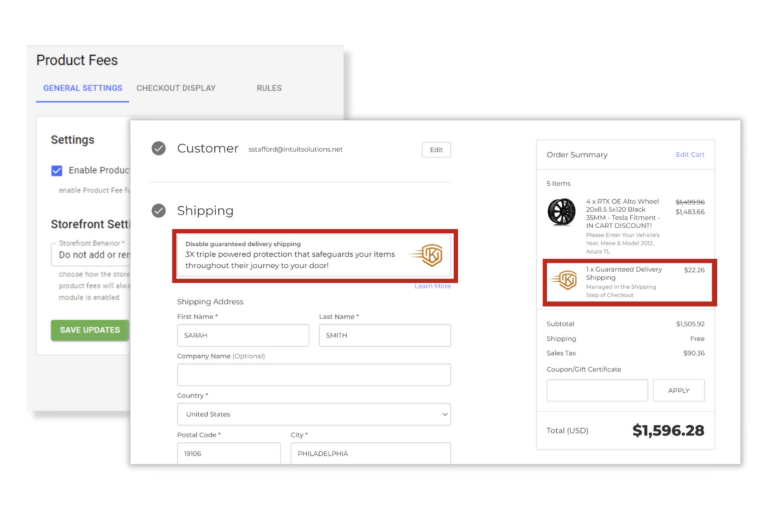
Offer delivery protection at checkout against lost, stolen, or damaged packages. $199/mo.
Recoup Payment Processing Fees
Add a fee based on the payment method the customer chooses. $199/mo.
One Flat Monthly Price
Everything Included at $199 per Month
One flat monthly price, every feature included, no add-on tiers, no per-order fees. Start with a free trial and keep it only if it earns its place in your checkout.
- Fees applied automatically by shipping destination
- Flat or percentage-based fees
- Apply to a single product or a product group
- Mixed cart support
- Fees shown in the cart, at checkout, and on the order confirmation email
- Add, adjust, or remove fees at any time
- Compatible with all BigCommerce themes
- Maintains full PCI compliance
- 30 day free trial, no contract
Recommended: Merchants who choose White Glove onboarding see the most success with the Ebizio Checkout app. Let our team configure the app for you, so you're live and working correctly from day one.
Destination-Based Product Fees FAQs
Frequently Asked Questions
Can I charge different fees for different destinations?
Yes. The fee applies based on where the order ships, so each destination carries the cost that applies to it.
Can I charge a flat fee or a percentage?
Either. Set a flat amount or a percentage-based fee, whichever fits the cost you're covering.
Can I apply a fee to just one product?
Yes. Apply a fee to a single product or to a group of products.
What if a cart has products with and without fees?
Mixed carts are fully supported. Customers check out normally, and fees apply only to the eligible items.
Where does the fee show up?
As a separate line item in the cart, at checkout, and on the order confirmation email. Showing a message about the fee on product pages or the cart takes some custom work. Contact us if you'd like it.
How is this different from Product Fees Manager?
Destination-Based Product Fees applies a fee based on where the order ships. Product Fees Manager applies a fee based on the product in the cart, whatever the destination. They're built to work side by side.
Does this handle excise tax?
No. Excise tax has its own module. See Excise Tax Manager, which charges excise tax based on the shipping address.
Will it work with my theme?
Yes. The module is built on Ebizio Checkout and works with all BigCommerce plans and every Stencil theme, including custom themes. It integrates with the native checkout, so there is nothing to rebuild.
How do I get this module?
Install Ebizio Checkout from the BigCommerce App Marketplace, then subscribe to Destination-based Product Fees for $199/month. 30 day free trial available.
Do you offer White Glove onboarding?
Yes. Our White Glove onboarding add-on covers checkout configuration and module setup, handled by the team that built Ebizio. Get Onboarding Support
Can you build a custom checkout for my store?
Yes. If you need functionality beyond the modules listed here, our developers can build it. Contact us to discuss your needs.
Custom Checkout for BigCommerce
Need Something Custom?
Need a custom checkout solution? We're happy to build it for you! Tell us what you're trying to do and we'll tell you whether a module covers it or whether it calls for custom development. Contact us to discuss your needs.