

Extend the BigCommerce Checkout
Product Fees Manager for BigCommerce
Price: $199 / Month — 30 Day Free Trial
Add a flat or percentage-based fee to any product or product group, optional or required, and show it as a clear line item at checkout.
Install note: This is part of the Ebizio Checkout app. To get it, install the Ebizio Checkout App and then subscribe to this module.

Is this right for your store?
Built for Merchants With Add-Ons Worth Charging For
If you offer add-ons or carry extra handling costs on certain products, you shouldn't have to absorb them. This module is a fit if:
- You offer extras, like faster delivery or a physical copy of a digital product, and you aren't charging for them
- You have products that cost more to handle and need a surcharge or handling fee
- You want some fees to be optional and others to be required
- You want fees tied to specific products, not a flat store-wide charge
If any of those describe your store, this closes the gap.
App Capabilities
What You Get with Product Fees Manager
Set the fee, choose the products, and let checkout do the rest.
Flat or Percentage Fees
Charge a fixed amount or a percentage of the product price, whichever fits the fee.
Any Product or Product Group
Apply a fee to a single product or to a group of products.
Optional or Required
Make a fee optional so customers can add or remove it, or required so it applies to every order that includes the product.
Mixed Cart Support
Carts with both fee and no-fee products check out seamlessly, with no awkward splits or errors.
Clear Line Items
Fees appear as separate line items in the cart, at checkout, and on the order confirmation email, so there are no surprises after the sale.
PCI Compliant
Built on BigCommerce's Open Source Checkout SDK, so you enhance your existing checkout instead of swapping it for a risky third-party system.
WHY IT'S SAFER
No Custom Code. No Compliance Risk.
Most checkout applications that add this kind of payment logic actually replace your platform's checkout experience, which is less reliable and less secure. Product Fees Manager runs on BigCommerce's own Open Source Checkout SDK, extending your native, PCI-compliant checkout instead of replacing it.
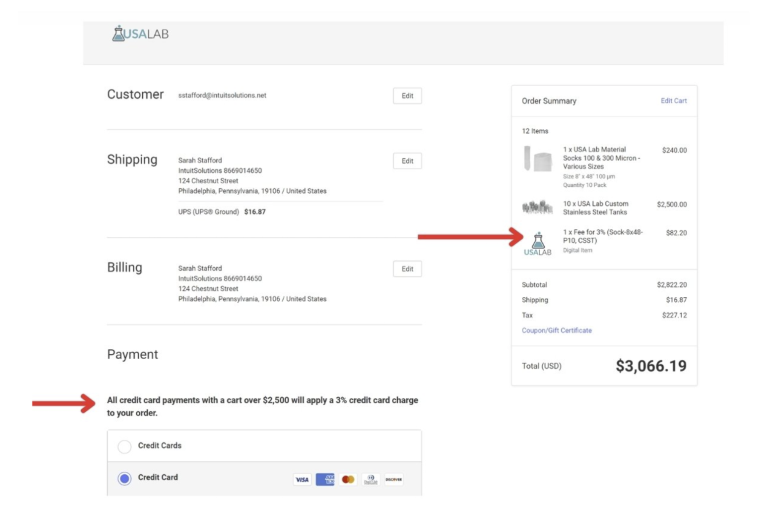
You're In Control
Configure It Your Way, From the Ebizio Dashboard
Manage your product fees directly from the Ebizio app in your BigCommerce admin. Set the fee, choose what it applies to, and see every fee on the orders it touches.
- Set the fee: Choose flat or percentage-based, and set the amount.
- Choose the products: Apply it to a single product or a group of products.
- Decide optional or required: Let customers opt out, or make the fee part of every order that includes the product.
- See fees on every order: Fees show on the order invoice in your BigCommerce back office.

Case Study
OESD: A USB Delivery Option for Digital Designs
OESD sells digital embroidery designs, and some customers prefer to receive them on physical media. We used Product Fees Manager so shoppers can add a USB drive to their order for a small fee. The fee appears as its own line item in the order total, customers can remove it before they pay, and OESD sees the charge on the order invoice in the back office. The result is an added revenue stream and a better experience for customers who want their designs on a USB drive.
Other ways merchants use it:
- Expedited delivery: Add an optional fee to products customers want faster, shown as a separate line item they can accept or remove.
- Handling surcharges: Add a required fee to products that cost more to handle, so the cost is covered on every order that includes them.
Build a Complete B2B Buying Experience
Other Modules You Might Need
Pair Product Fees Manager with the rest of the Ebizio Checkout suite.
Destination-Based Product Fees
Apply fees to products based on where the order ships. $199/mo.
Shipping Protection
Offer delivery protection at checkout against lost, stolen, or damaged packages. $199/mo.
Recoup Payment Processing Fees
Add a fee based on the payment method the customer chooses. $199/mo.
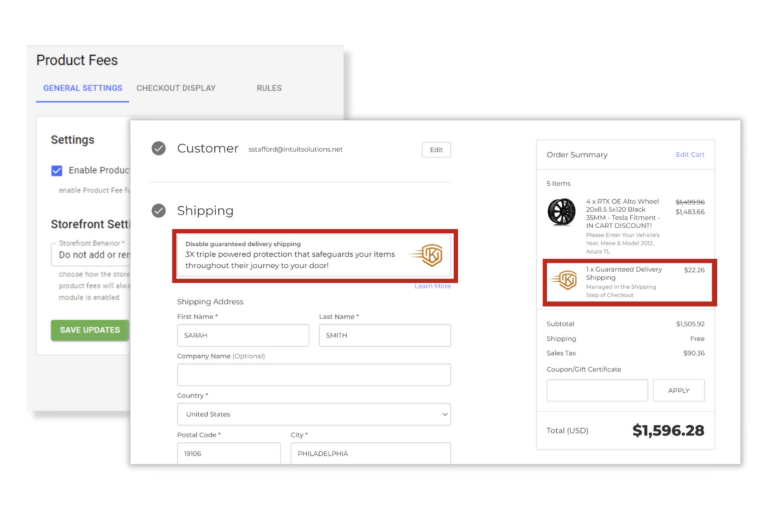
One Flat Monthly Price
Everything Included at $199 per Month
One flat monthly price, every feature included, no add-on tiers, no per-order fees. Start with a free trial and keep it only if it earns its place in your checkout.
- Flat or percentage-based fees
- Apply to a single product or a product group
- Optional or required fees
- Mixed cart support
- Fees shown in the cart, at checkout, and on the order confirmation email
- Fees visible on order invoices in the back office
- Compatible with all BigCommerce themes
- Maintains full PCI compliance
- 30 day free trial, no contract
Recommended: Merchants who choose White Glove onboarding see the most success with the Ebizio Checkout app. Let our team configure the app for you, so you're live and working correctly from day one.
Product Fees Manager FAQs
Frequently Asked Questions
Can I charge a flat fee or a percentage?
Either. Set a flat amount or a percentage-based fee, whichever fits the product.
Can I apply a fee to just one product?
Yes. Apply a fee to a single product or to a group of products.
Can customers decline a fee?
If you make the fee optional, yes. Customers can add or remove it before they pay. If you make it required, it applies to every order that includes the product.
What if a cart has products with and without fees?
Mixed carts are fully supported. Customers check out normally, and only the products you've set up carry a fee.
Where does the fee show up?
As a separate line item in the cart, at checkout, and on the order confirmation email. You'll also see it on the order invoice in your BigCommerce back office.
How is this different from Destination-Based Product Fees?
Product Fees Manager applies a fee based on the product in the cart. Destination-Based Product Fees applies a fee based on where the order ships. They're built to work side by side.
Does it work with a custom checkout or multi-storefront setup?
Those setups need a quick conversation first. Contact us before you install and we'll confirm compatibility.
Will it work with my theme?
Yes. The module is built on Ebizio Checkout and works with all BigCommerce plans and every Stencil theme, including custom themes. It integrates with the native checkout, so there is nothing to rebuild.
How do I get this module?
Install Ebizio Checkout from the BigCommerce App Marketplace, then subscribe to Product Fees Manager for $199/month. 30 day free trial available.
Do you offer White Glove onboarding?
Yes. Our White Glove onboarding add-on covers checkout configuration and module setup, handled by the team that built Ebizio. Get Onboarding Support
Can you build a custom checkout for my store?
Yes. If you need functionality beyond the modules listed here, our developers can build it. Contact us to discuss your needs.
Custom Checkout for BigCommerce
Need Something Custom?
Need a custom checkout solution? We're happy to build it for you! Tell us what you're trying to do and we'll tell you whether a module covers it or whether it calls for custom development. Contact us to discuss your needs.