
BigCommerce Catalyst + Makeswift: Headless Without the Dev Queue
Date Published

Your storefront should move as fast as your marketing calendar. For many ecommerce teams, it doesn’t. New landing pages wait in a development queue, custom features get forced into themes that weren’t built for them, and every quick update becomes another ticket.
Headless commerce promised more flexibility, but it brought higher development costs, more complex maintenance, and marketing teams still dependent on developers.
BigCommerce Catalyst and Makeswift close that gap. Catalyst gives developers a modern framework for building custom headless storefronts. Makeswift gives marketing teams visual tools to run the customer-facing experience without touching code.
Here’s how they work together and what they make possible.
What Is BigCommerce Catalyst?
BigCommerce Catalyst is BigCommerce’s open-source, composable storefront framework for building headless ecommerce websites.
Built on Next.js, React, and the BigCommerce GraphQL Storefront API, Catalyst separates the storefront from the commerce engine. Developers control how the site looks and functions, while BigCommerce handles products, pricing, carts, orders, and checkout.
Unlike a Stencil theme, developers build the frontend application itself rather than customizing within a hosted theme.
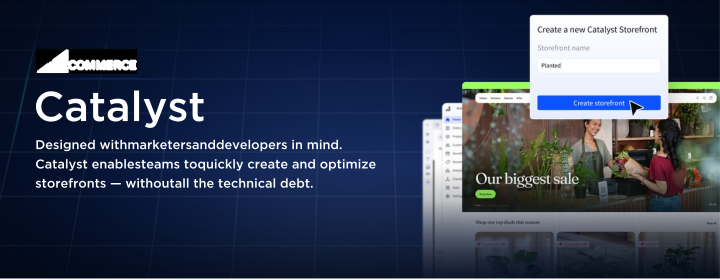
Catalyst ships with core ecommerce functionality already built:
- Product and Category Pages: Listings, product details, and faceted filtering.
- Storefront Search: Connected to the BigCommerce product catalog.
- Cart and Checkout: Integrated with BigCommerce’s hosted checkout.
- Customer Accounts: Registration, login, account management, and order history.
- Multi-Storefront and Localization: Support for multiple storefronts and markets.
- Makeswift Integration: Built-in visual editing.
Catalyst gives you a performance-oriented starting point. Final site speed, Core Web Vitals, and SEO depend on the implementation.
How BigCommerce Catalyst Works
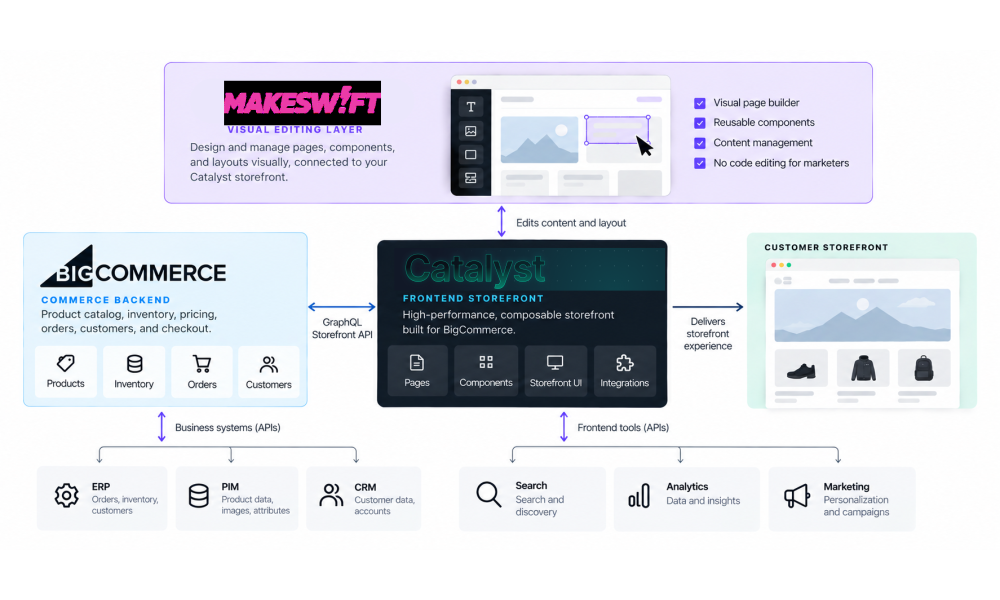
Catalyst runs as a separate frontend application that communicates with BigCommerce through APIs:
- BigCommerce manages commerce data and operations.
- Catalyst powers the storefront’s design, navigation, and custom experiences.
- Makeswift provides visual editing for pages and content.
- Third-party systems like ERP, PIM, CRM, and search connect through APIs.
Because the layers are separate, you can evolve the frontend without replacing the systems that run your business.
What Is Makeswift for BigCommerce?
Makeswift is BigCommerce’s visual, drag-and-drop editor for building and managing storefront pages. In a custom headless build, new layouts or component changes typically require a developer. Makeswift gives nontechnical users a visual interface for working with components developers configure.
Key Makeswift Features
- Drag-and-Drop Builder: Create and edit pages visually, no code required.
- Real-Time Collaboration: Multiple teammates can edit the same page at once.
- Scheduled Publishing: Set updates and campaigns to go live at a specific time.
- Global Components: Update a shared element once and it changes everywhere.
- Version History: Roll back to any previous version of a page.
- Localization: Adapt content for different languages and markets.
- Responsive Controls: Adjust and preview layouts for desktop, tablet, and mobile.
- Custom React Components: Use developer-built components with editable settings.
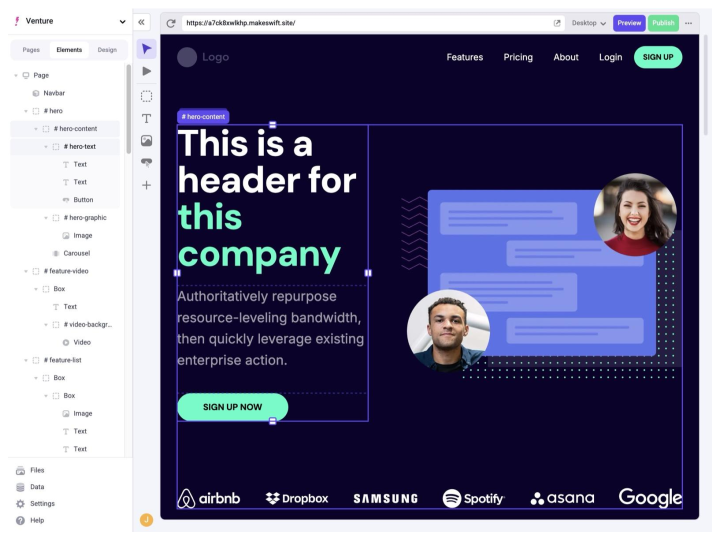
Image Source: Makeswift Visual Builder Documentation
In practice, that means marketing teams can launch campaign landing pages and microsites, publish educational content, and roll out localized pages without opening a dev ticket. How much they can do depends on the components and permissions developers set up during the build.
How Catalyst and Makeswift Work Together
Catalyst is the application. Makeswift is the editing layer on top of it.
A developer builds a product comparison tool, a branded promotional section, or an interactive content module, registers it in Makeswift, and decides which settings marketers can edit. Marketers then use it on any page without touching the code.
That creates two clear lanes:
- Developers own storefront architecture, custom components, integrations, performance, and editing permissions.
- Marketers own page content, campaign landing pages and microsites, scheduled launches, localized content, and educational resources.
Benefits of Going Headless with BigCommerce Catalyst + Makeswift
Together, Catalyst and Makeswift address challenges related to storefront customization, content management, development efficiency, and long-term flexibility.
Build the Storefront Your Customers Need
Catalyst removes theme constraints, so you can build specialized product pages, custom navigation, and purchasing workflows around your customers. That matters most for merchants with complex catalogs, B2B requirements, or nonstandard buying journeys.
Launch Campaigns on Marketing’s Timeline
Marketers create landing pages, update content, and schedule campaigns without waiting on development. Developers spend their time on integrations, custom functionality, and performance instead of routine page updates.
Integrate Your Ecommerce Technology Stack
Catalyst’s headless architecture supports custom integrations with ERP, PIM, CRM, search, and other business systems, so your storefront fits your operations.
Build a Foundation for Performance and SEO
Next.js gives Catalyst modern rendering, efficient data fetching, and full control over page structure. Sustaining that advantage takes thoughtful development and ongoing optimization.
Scale Without Rebuilding
Reusable components and a decoupled frontend let you add new experiences and expand into new markets without replacing your commerce platform.
BigCommerce Catalyst vs. Stencil: What's the Difference?
Catalyst isn't the right fit for every merchant. BigCommerce Stencil remains a powerful option for businesses that want a traditional BigCommerce-hosted storefront without taking on the additional responsibilities of headless development.
.svg?2026-10-26T01%3A35%3A48.279Z)
Can You Use Makeswift Without Catalyst?
Yes. Makeswift is also available for Stencil storefronts through a beta integration.
This allows merchants to explore visual editing capabilities without migrating to a headless architecture.
However, the editing experience and customization capabilities differ. Catalyst supports developer-created React components registered in Makeswift, while the Stencil integration uses components and editing controls designed for its theme environment.
The decision between Catalyst and Stencil should ultimately reflect the business's development, integration, customer experience, and content management requirements.
Catalyst + Makeswift in Action: Inorganic Ventures
Inorganic Ventures, a manufacturer of certified reference materials and calibration standards, used BigCommerce for cart and checkout, but Magento still powered its customer-facing website. That setup created ongoing security, SEO, and content management challenges, and left the marketing team relying on developers to publish the technical resources its B2B buyers depend on.

Our team rebuilt the frontend on BigCommerce Catalyst, replacing Magento while preserving BigCommerce’s commerce functionality. The new storefront supports the company’s specialized B2B requirements, including technical product information, custom quote requests, and integrations with its business systems.
We built Makeswift into the storefront so internal teams can publish educational content and manage pages without a developer for every update.
Read the Inorganic Ventures Case Study →
Is BigCommerce Catalyst + Makeswift Right for Your Business?
Catalyst and Makeswift offer substantial flexibility, but adopting a headless storefront is an important architectural decision.

Going headless is a significant architectural decision. Catalyst + Makeswift deserves a serious look if:
- Your storefront limits what you can build. Custom experiences or business requirements have outgrown your current architecture.
- Marketing depends heavily on developers. Routine updates and campaign launches eat technical resources.
- You sell B2B or have complex purchasing workflows. Account experiences, quote requests, or custom product configurations require real frontend development.
- You operate across multiple markets. Separate storefronts, languages, or localized content are core requirements.
- You’re planning a redesign or replatform. A major website investment is the right time to rethink your architecture.
What to Consider Before Moving to Catalyst
- Development and Maintenance: Headless storefronts require specialized frontend expertise and ongoing support.
- Hosting: Catalyst runs as a separate Next.js application and needs its own deployment strategy, typically on Vercel or another Next.js-compatible hosting provider. BigCommerce’s native Catalyst hosting is currently in closed beta.
- Apps and Integrations: Some BigCommerce apps built for Stencil need additional development or alternatives to work with Catalyst.
- Migration Planning: Account for existing functionality, content, SEO, redirects, and integrations.
BigCommerce Catalyst + Makeswift Development with IntuitSolutions
Catalyst gives you a modern framework. Getting the most from it takes developers who know BigCommerce, custom ecommerce functionality, and the systems behind your business.
As a BigCommerce Elite Partner, our team specializes in Catalyst development, Makeswift implementation, custom UX/UI design, headless migrations, third-party integrations, and ongoing optimization. We build both lanes: the architecture and integrations your business runs on, and the Makeswift components your marketing team uses every day.
Whether you’re replacing an outdated storefront, modernizing an existing headless build, or weighing Catalyst against Stencil, we’ll help you choose and build the right approach.
Explore Our BigCommerce Headless Development Services or contact our team to discuss your project.